Which Number Is Rational? Apex Learning Answer
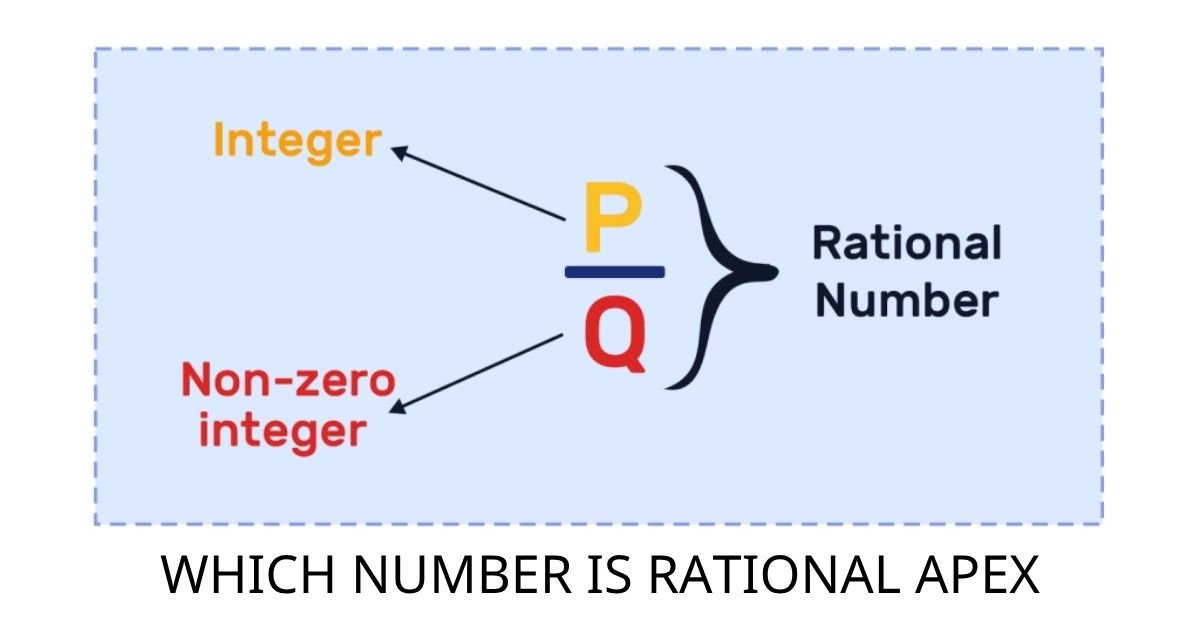
Students working through Apex Learning’s Algebra 1 unit on rational and irrational numbers often hit one specific quiz question that trips them up: “Which number is rational?” This article gives you the direct answer to the “which number is rational apex” question and, more importantly, explains the reasoning clearly enough that you can answer any version of it confidently. The quizzes typically presents four options, including things like 0.333…, pi, square roots, and integers, and asks you to pick the rational one. By the end of this page, you will know exactly why one of those options qualifies and the others do not. Quick Answer From the typical Apex Learning quiz options, 0.333… (or 1/3) is the rational number. A number is rational if it can be written as a fraction of two integers. Repeating decimals like 0.333… always can be. Numbers like pi, square root of 2, or any non-repeating infinite decimal cannot, so they are irrational. What Makes a Number Rational? Think of the word “rational” as having the word “ratio” buried inside it. A rational number is simply any number that can be expressed as a ratio of two whole numbers, written as p/q, where p and q are both integers and q is not zero. That one rule covers a much wider range of numbers than most students initially expect. Whole numbers are rational because any whole number can be placed over 1. The number 5 becomes 5/1, the number 12 becomes 12/1, and even negative integers work the same way. Fractions with integer numerators and denominators are obviously rational too, since they are already written in the required form. The less obvious category is decimals, and that is exactly where the Apex Learning quiz tests you. Decimals split into two groups. A decimal that terminates, meaning it ends at some point, is always rational. The number 0.75 equals 3/4, and 0.6 equals 3/5, both clean fractions. A decimal that goes on forever can still be rational if it repeats in a pattern. The number 0.333… is just another way of writing 1/3, and 0.090909… equals 1/11. Repeating patterns always signal that the number can be converted to a fraction. The Four Types of Numbers in the Apex Quiz The Apex Learning quiz on rational and irrational numbers typically includes four answer options designed to test whether you can apply the definition rather than just memorize it. Recognizing each type quickly is the key skill the quiz is measuring. 0.333… (or 0.3 with a bar over it) is the rational number in most versions of this question. The repeating decimal 0.333… equals exactly 1/3, which is a fraction of two integers. That satisfies the definition completely, and this is the answer you should select. Pi (approximately 3.14159…) is irrational. Its decimal form never ends and never settles into a repeating pattern. Mathematicians have calculated pi to trillions of digits and found no repeating cycle anywhere. No fraction of two integers can produce pi exactly, which is why we keep it as the symbol rather than writing it as a number. The square root of 2 (approximately 1.41421…) is also irrational. It was actually the first number ever proven to be irrational, discovered by ancient Greek mathematicians. Like pi, its decimal never terminates and never repeats. If you see any square root of a number that is not a perfect square in the quiz options, it is irrational. Integers like 5 or -3 are rational, since they equal 5/1 or -3/1. If an integer appears as an answer option alongside 0.333…, both are rational, but quiz versions usually include only one rational option among three irrational ones. How to Spot a Rational Number in Any Quiz The three-step method works for every version of this question, whether it appears on Apex, a state exam, or a classroom test. First, check if the number is an integer or a plain fraction with integers on top and bottom. If yes, it is rational, and you are done. Second, if the number is a decimal, check whether it terminates. A decimal that ends at any point is rational without exception. Third, if the decimal goes on indefinitely, look for a repeating pattern. A bar over one or more digits in the written form tells you those digits repeat. If a pattern exists, the number is rational. If the digits appear random and never settle into a cycle, like pi or the square root of 7, the number is irrational. Running through those three steps takes about ten seconds once you have practiced them a couple of times. For deeper practice with numbers involving square roots and radicals, Numberble’s Radical Calculator lets you evaluate radical expressions quickly, which helps when checking whether a square root simplifies to a whole number (rational) or stays in irrational form. What Most People Get Wrong About Rational Numbers The most common mistake on this exact Apex quiz question is assuming that any decimal must be irrational. Students see a number like 0.333… going on forever and immediately think “it never ends, so it must be irrational.” That logic feels reasonable but is wrong, and the quiz is specifically designed to catch this misunderstanding. The correct rule is not about whether the decimal ends, but whether it follows a predictable pattern. A decimal that repeats, no matter how long the repeating block is, can always be converted into a fraction. The number 0.142857142857… repeating, for example, equals exactly 1/7. The length of the repeating cycle does not matter at all. What disqualifies a decimal from being rational is when the digits are genuinely random with no repeating block, which is what happens with pi and non-perfect-square roots. Understanding this distinction also protects you from a second error: dismissing something like 0.666… as irrational because it looks “messy.” The value 0.666… equals 2/3 exactly, making it rational without any doubt. According to Math Is Fun’s guide on irrational numbers, a reliable way to remember this is … Read more